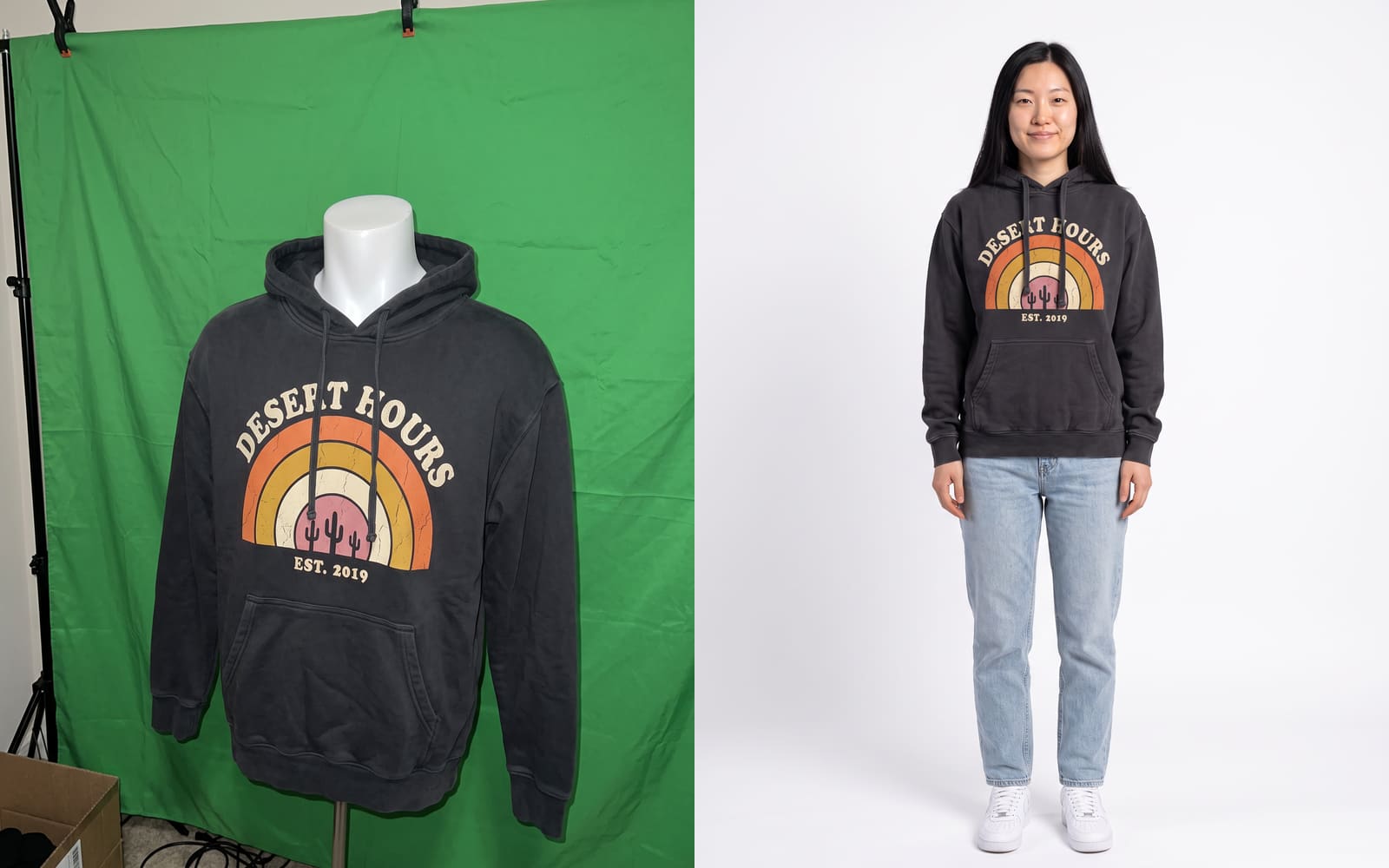
The cheapest way to get on-model product photos without a photoshoot is an AI on-model tool: you photograph the garment once, on a hanger, a mannequin or flat on the floor, and the tool puts it on a model. The other options are shooting it yourself with a friend as the model, hiring a freelance model for a few hours, or skipping the model with ghost mannequin shots.
Each one trades money for time or for control. Below is what each costs for a typical small catalog, what goes wrong, and how to pick.
The 5 options at a glance
For a brand with 20 products and 4 photos each, AI tools cost tens of dollars, DIY costs mostly your time, and a booked studio shoot costs thousands. The table compares them on what matters to a small brand.
| Option | Cash cost for 80 photos | Your time | Same model on every product | Main risk |
|---|---|---|---|---|
| AI on-model tool | About $38 with Seam Shots ($0.49 a photo, 3 free) | 1 to 2 hours | Yes, if the tool saves the model | Details can drift, every photo needs a check |
| DIY with a friend as the model | Low, mostly gear and favors | 1 to 3 days incl. editing | Only if the same friend is free every drop | Uneven light, amateur posing |
| Freelance model, you shoot | Model fee plus your gear | 1 day plus editing | Only while you keep booking them | Scheduling every new drop |
| Ghost mannequin, no model | Low DIY, or a studio fee per shot | Half a day plus editing | No model at all | Shoppers can’t see fit on a body |
| Studio with a model (for reference) | Thousands, see below | Planning plus a shoot day | Yes, for that one day | Reshoots for every new colorway |
What a booked shoot costs, for comparison
A full-day professional photoshoot for a clothing line runs $2,000 to $8,000, and model shoots with a full crew run $2,000 to $15,000 a day, according to Squareshot’s 2026 cost guide. Its online calculator listed 10 on-model images for $1,450 and $95 for each additional image.
Last checked October 26, 2026, on squareshot.com/post/clothing-brand-photoshoot-cost.
The same guide lists:
- Model fees of $100 to $2,000+ per model.
- Photographers at $1,000 to $5,000 a day, or $50 to $500 an hour.
- Hair and makeup at $150 to $800 a day.
- Basic retouching at $5 to $20 per image.
- Product-only shots (flat lay or mannequin) at $15 to $75 per shot.
- A DIY shoot at $200 to $800.
At those calculator prices, 80 on-model images would come to $1,450 plus 70 × $95, which is $8,100, before retouching. That is the number the cheaper options are competing with.
Option 1: an AI on-model tool
An AI on-model tool takes one photo of your garment and returns it worn by a model, usually in under a minute. It is the only option where a new colorway next week costs the same few dollars as the first batch.
With Seam Shots, an AI studio for small clothing brands, the steps are:
- Upload a product photo. Flat-lay, hanger, mannequin or a phone shot all work, or paste the product link from your store and the studio pulls the photo.
- Pick a model. There are 8 ready models of different ages, body types and backgrounds. You can also build your own model from settings like age, body, hair and expression (1 token), or upload photos of a model you already work with, with their consent.
- Set the scene. Describe it in a sentence, or pick a saved location. A location saved with a reference photo (1 token) keeps every shot there matching.
- Pick a format. 4:5, 1:1, 3:4, 2:3 or 9:16, and up to 4 photos at once.
- Check and download. A photo takes about 25 seconds. A failed photo gives the token back.
The math for 80 photos: the first 3 are free, so you buy 77 tokens for $37.73. Tokens start at 20 ($9.80), never expire, and there is no subscription. You get full commercial rights to the images.
Where it falls short: AI can change small things. Check printed text, logos, buttons, pocket placement and hem length on every photo before it goes live. It can’t tell a shopper how your size M actually fits, so keep your size chart and measurements next to the photos.
You can try it with 3 free photos, no card needed.
Option 2: shoot it yourself with a friend as the model
Shooting a friend or yourself costs almost nothing in cash and gives you real photos of the real fit. The cost is time: setup, the shoot, picking frames and editing usually eat a few days per collection.
To make it look less homemade:
- Shoot next to a big window on an overcast day, or in open shade outside. Never under mixed indoor bulbs.
- Use one plain wall and keep it the same for every product.
- Lock the phone on a tripod at chest height, 2 to 3 meters away, and use the 2x lens so the body isn’t distorted.
- Shoot the same 4 poses for every item: front, back, three-quarter, a detail.
Where it falls short: your friend may not be free for the next drop, so your store slowly fills with different faces and lighting. Get a short written OK from them that you can use the photos commercially.
Option 3: hire a freelance model and shoot yourself
Booking a freelance model for a few hours and shooting yourself gets you a professional face at a fraction of a studio day. Model fees in Squareshot’s guide start around $100 per model.
Write down before the shoot: how many hours, how many outfits, where you will use the photos (store, ads, print) and for how long. Usage rights are where most disputes start.
Where it falls short: every new drop means booking again, and the model you used in spring may not be available in fall.
Option 4: ghost mannequin or flat-lay, no model at all
A ghost mannequin shot is the garment photographed on a mannequin, with the mannequin removed in editing, so it looks worn by an invisible body. It is clean and consistent, and it sits well next to model shots.
It is the budget floor: Squareshot lists product-only shots at $15 to $75 each, or you can do it yourself with a mannequin and a background-removal app.
Where it falls short: shoppers can’t see how the piece sits on a person, and lifestyle and social posts still need a body in the frame. These photos also make the best input for an AI tool, so a mannequin shot is never wasted.
How to photograph the garment for an AI tool
The AI can only reproduce what it can see, so the input photo matters more than the camera. A recent phone is enough.
- Light: even daylight, no flash, no strong shadows across the print.
- Frame: the whole garment, edge to edge, nothing cropped, nothing folded over the print or logo.
- Shape: on a hanger or mannequin if you can, smoothed flat if not. Wrinkles become wrinkles on the model.
- Color: a neutral background, so the color isn’t thrown off. Check the photo next to the real garment.
The hoodie at the top of this page was a phone photo on a mannequin in front of a green sheet, with a cardboard box in the corner. The tool still got the print, the drawstrings and the kangaroo pocket right, because they were all clearly visible.
Which option to pick
Pick by how often you release and how much your shoppers care about fit.
| Your situation | Best fit |
|---|---|
| New drops every month, tight budget | AI tool for every product, check each photo |
| Few products, fit is the selling point (swim, denim, tailoring) | Freelance model or DIY for hero shots, AI for extra colorways |
| You already have mannequin shots | Keep them as the clean listing photo, add AI on-model photos next to them |
| A campaign or lookbook that sells a mood | A real shoot, then AI to extend the same look to the rest of the line |
Mixing works well. A common setup is one real hero image per collection with the rest of the catalog filled by on-model photos from a tool, using the same model so the store looks like one shoot.
The honest limits of AI photos
AI on-model photos are a draft, not a finished asset, until you have checked them. Look at every image at full size next to the garment.
- Text and small logos can be misspelled or simplified.
- Hands and fingers can look off.
- Sheer, sequined and very fine-knit fabrics are the hardest to reproduce.
- The model’s body is generated, so the drape shows how the garment could fit, not a measurement of your sizes.
If a photo is wrong, generate another one rather than editing around it, and never publish an image that shows a detail your product doesn’t have. That protects you from returns and from shoppers who feel misled.